

What it is and what it costs
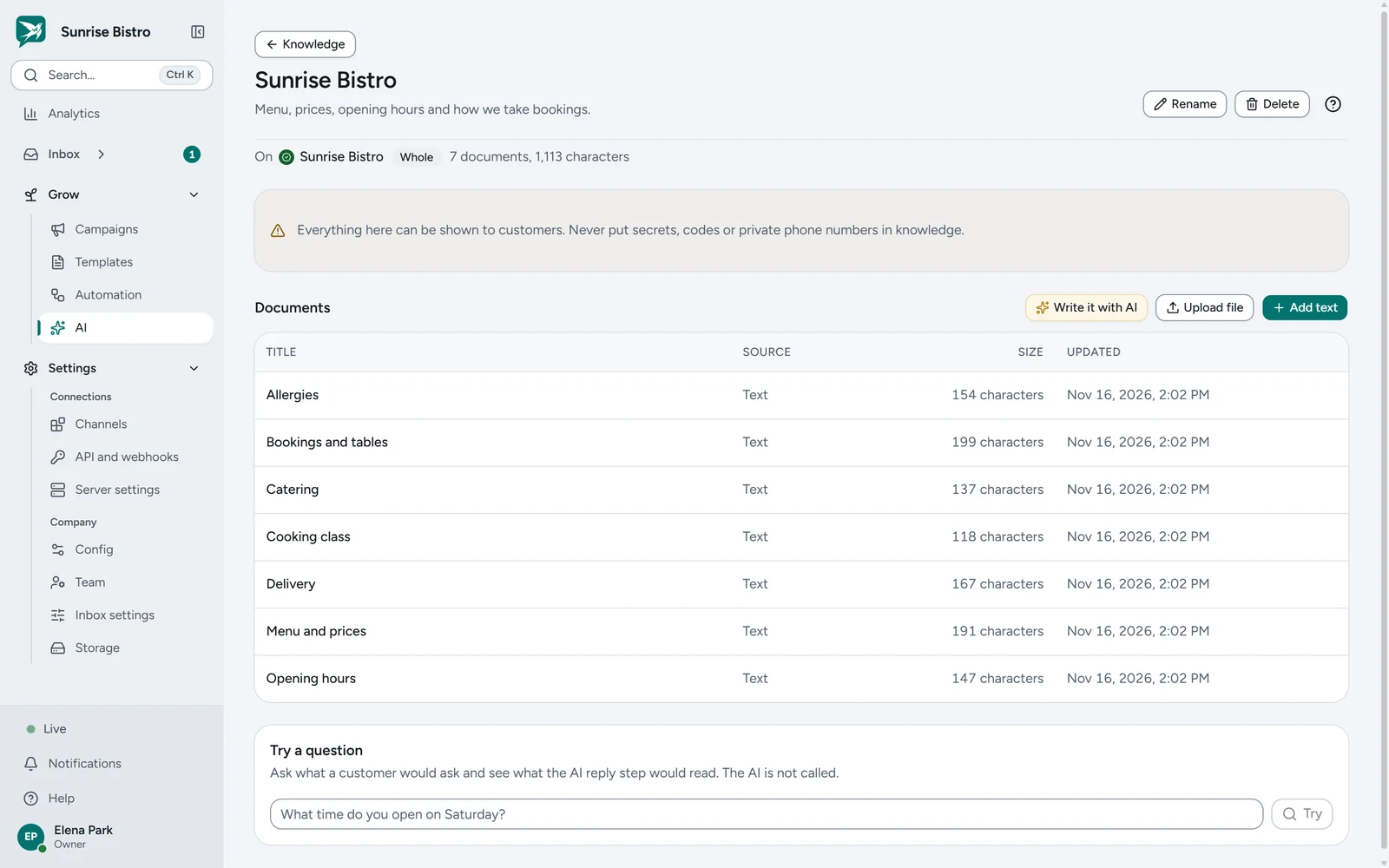
A knowledge base is a set of documents about your business. Pick it in a flow's AI reply step and the AI reads it before it answers. Up to 20,000 characters, the AI reads everything (AI reads all); larger knowledge is searched by keyword (Keyword search).
Storing knowledge is free; your plan sets how many documents you can have. An AI reply with a knowledge base uses about 2 to 6 Welkai AI credits a message today, shown under the step.
Steps
- On AI > Knowledge, press New knowledge base and give it a Name, for example "Shop FAQ".
- Open it and press Add text to paste a Title and Text, or Upload file for a .txt, .md, .csv or .docx file up to 2 MB.
- Use Try a question: type what a customer would ask, like "What time do you open on Saturday?", and see what the AI would read. This does not call the AI and costs nothing.
- In a flow, add AI reply and pick the knowledge base.
Write it with AI
Press Write it with AI on a knowledge base. Use From your website (Welkai reads that page and up to 9 pages it links to, like About or Prices), Describe your business (a short form, any box may stay empty) or Paste text (a menu, price list or old FAQ).
The AI writes documents for you to check. It uses only what you gave: where a price, time or rule is missing it writes [add your details] and lists what is missing. It leaves out anything that looks private, like passwords, bank or card numbers, ID or passport numbers and personal phone numbers.
Fix anything wrong and press Remove on what you do not want. Nothing is saved until you press Save, and each saved document counts toward your plan.
Each draft uses about 2 to 29 Welkai AI credits (20 times that with the Smart model, at most 500), shown before you press Write documents. Write again costs again. With your own AI key, your provider bills you instead.
Write it so the AI finds it
Write in the language your customers use, with the words they use, because large knowledge is searched by keyword. One knowledge base per product line or language works well.
Everything here can be shown to customers. Never put secrets, codes or private phone numbers in knowledge.
Common problems
"Use a .txt, .md, .csv or .docx file.": save the file in one of these formats first. "The file is over 2 MB": split it or paste the part you need with Add text.
The buttons are grey: your plan's documents are used up. Delete old ones, or someone with the Billing: pay permission presses See plans.