

What it is and what it costs
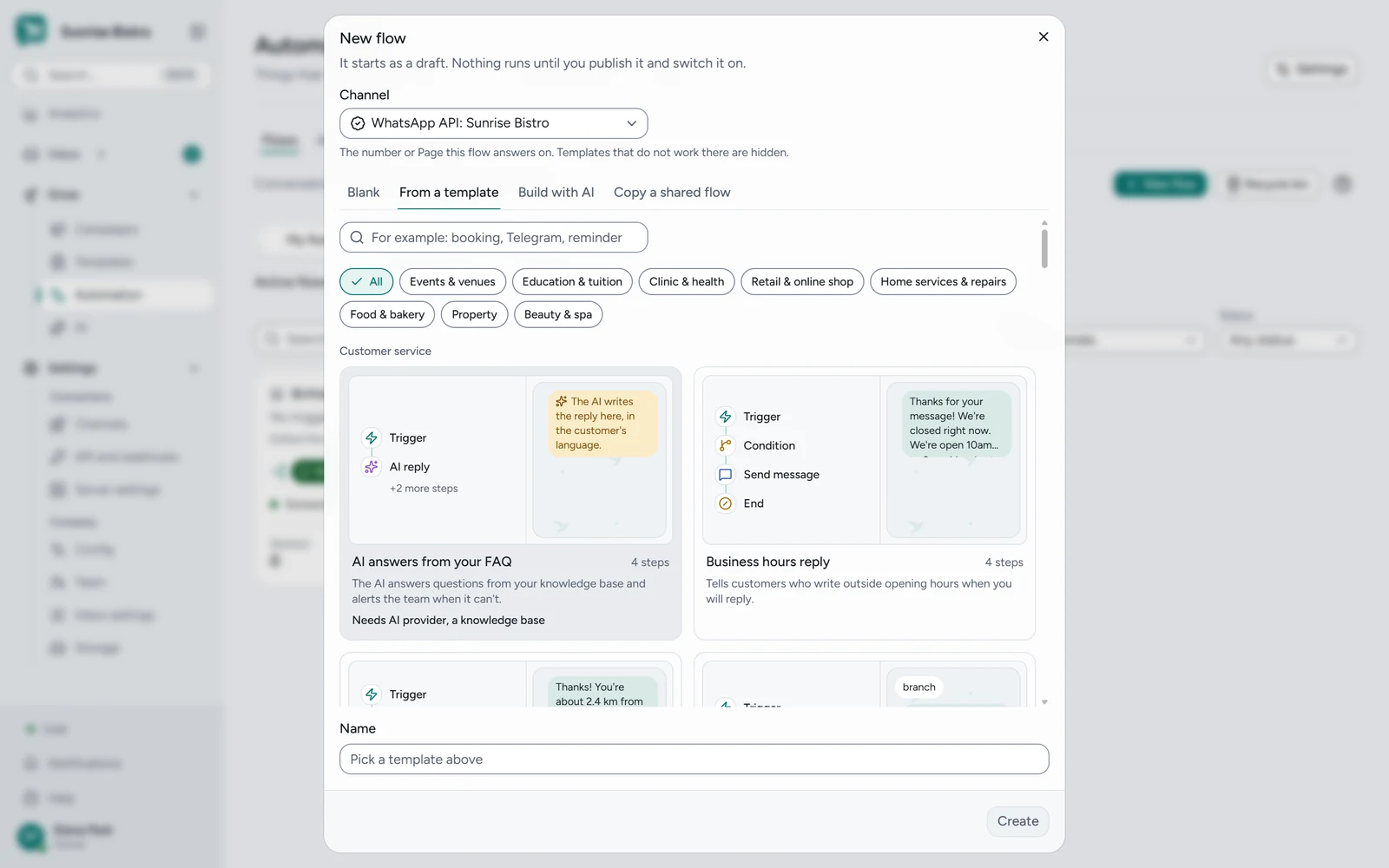
A template is a finished flow you copy and adjust. The gallery groups them under Customer service, Sales, Bookings, Marketing and Feedback, and shows only the ones that work on the channel you pick for the new flow.
The industry buttons above the gallery narrow it to your trade, with four templates each: Food & bakery, Beauty & spa, Retail & online shop, Clinic & health, Property, Education & tuition, Events & venues and Home services & repairs. All shows every template. For example Cake pre-order with a deposit, Book a treatment with AI, Home loan estimate and Fee due reminder. If you named your industry when you signed up, the gallery opens on it; when Welkai does not know your industry, it shows every template.
Some examples: Welcome menu, Business hours reply, Ask for a phone number, Follow up a quiet lead, Confirm a cash on delivery order, Festive promotion, Reply to comments in DM, Mark spam messages, and AI answers from your FAQ.
Templates are free. Those with AI steps, such as AI answers from your FAQ, use Welkai AI credits each time they run; the editor shows the estimate under each AI step.
Steps
- Open Automation > Flows and press New flow.
- Choose From a template. Under Channel, pick the number, Page, Instagram account, Telegram bot or Telegram account it answers on: templates that do not work there are hidden. Press your industry or All, and click the template you want. A template that needs something first, such as a knowledge base, says so.
- Give it a Name and press Create. The editor opens with Notes from the template.
- Read Notes from the template: change the example words to yours, then test it with Simulate (nothing is sent).
- Check Runs on, then press Publish and switch it on.
Before you switch one on
Turn on only one booking template per number: flows that start on the same words, like book, tempah or 预约, compete for the message.
Timed templates, like Daily menu message, Weekly new listings and New term reminder, send by themselves on a schedule or a date. Each message counts toward your broadcast messages, and new accounts send them to many contacts only after their first paid month with no spam reports (Terms 7.3). They run on WhatsApp numbers linked by QR code and on Telegram, because Meta lets other WhatsApp numbers start a chat only with an approved template. A Telegram bot sends them only to people who started it. More in flows on a schedule or a date.
New term reminder sends once, on 4 January 2027 at 09:00 as written. Change the date in its Trigger step to a few days before your own term starts: a date already past never sends.
What happens next
Your copy is yours: changing it never changes the template, and later template updates do not touch your flow. To learn the editor, read Flows.