

What it is and what it costs
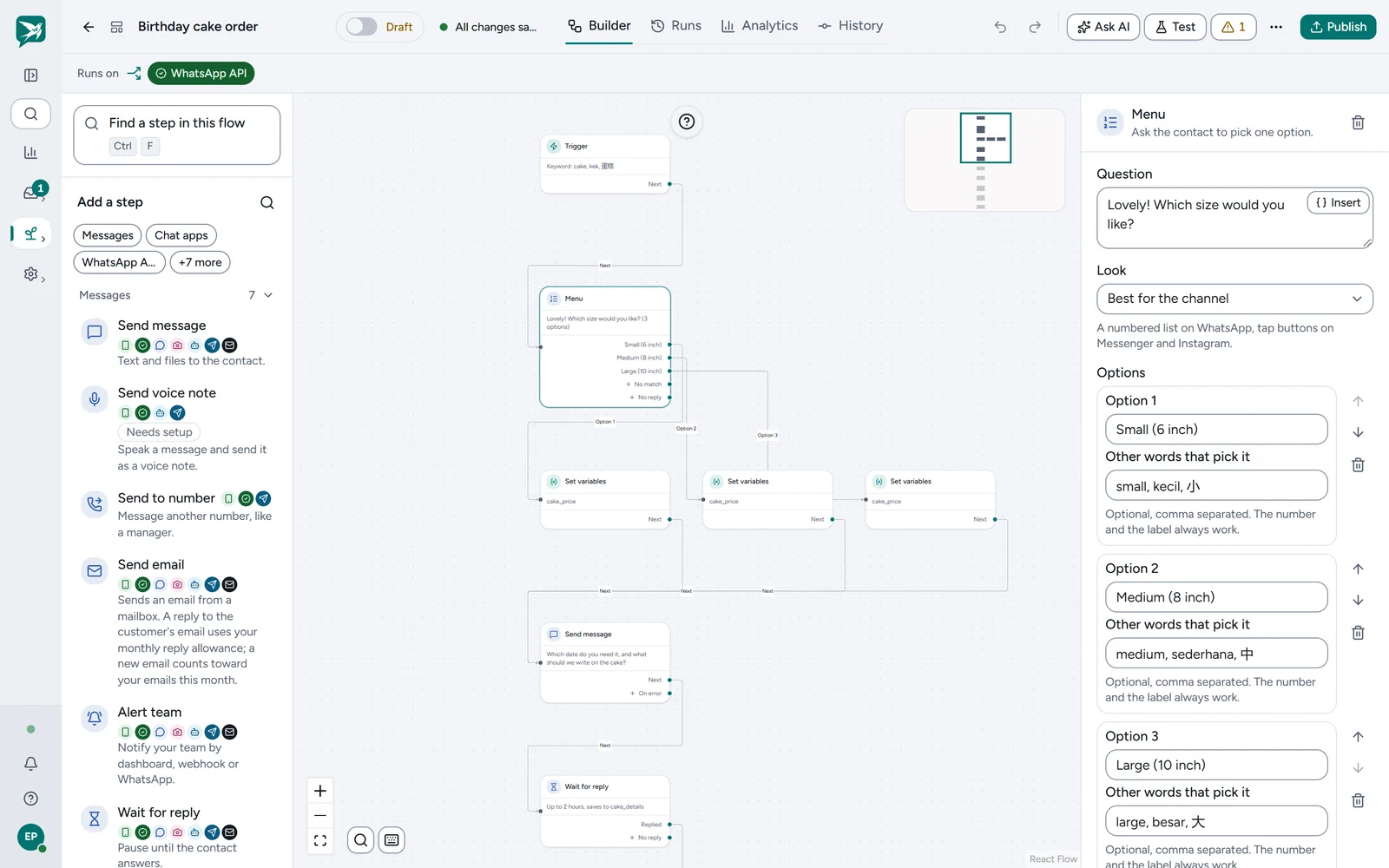
A flow starts when something happens, the Trigger, for example "A message has a keyword". Then it runs its steps in order, one customer at a time: send a message, wait for the reply, ask with a menu, tag the contact, hand the chat to your team with Hand over to team.
A flow belongs to your business, not to one number. Its Runs on list says where it answers: tick your WhatsApp numbers, Facebook Pages, Instagram accounts, Telegram bots and Telegram accounts, and one flow with one set of results covers them all.
Team inbox chats can start a flow too. Under Starts when, pick A chat is marked done, A topic is added to a chat or A topic is removed from a chat. Leave Topic empty for any topic, or type one such as refund; the topic is in {{trigger.topic}} for your messages. They work on WhatsApp, Messenger and Instagram. A flow never starts itself, and a chain of such starts stops after 5. The Team inbox action step can also Set the priority, for example to Urgent.
Request a live agent opens a ticket and hands the chat to your team, and saves the ticket number in {{inbox.ticket_no}}: see Tickets. Set lifecycle stage moves the customer to a stage such as Interested or Customer, on every linked account; a new step has no stage until you pick one, or No stage (clears it). See Contacts and Customers.
Flows are free. Your plan sets your Active flows, the flows switched on at the same time: 3 on the trial and Solo, 4 on Plus, 5 on Team, and no limit from Growth up. Drafts and switched-off flows do not count, up to 200 per business. Only AI steps use Welkai AI credits, shown under each one as Estimated AI credits each time this step runs.
Make a flow
You need: a number, Page, Instagram account, Telegram bot or Telegram account connected in Channels > Your channels, and a role with Flows: edit (and Flows: publish to switch flows on).
- On Automation > Flows, press New flow. Choose From a template, Blank or Build with AI, give it a Name and press Create.
- Click the Trigger step and choose under Starts when, for example A message has a keyword with the keyword "price".
- Check Runs on at the top. A new flow starts on the number you picked when you made it (one made with Ask AI starts on up to 3 of your own numbers its trigger can use); tick or untick numbers, Pages and accounts there.
- Add steps from the left, such as Send message, Wait for reply or Menu, and join them with lines. Each step shows the platforms it works on.
- Press Test and choose Simulate (nothing is sent). Pick the platform to try, type what a customer would send and watch the answers.
- Press Publish, then switch the flow on with the on and off switch at the top.
Runs on and other platforms
Pick numbers one by one, or choose All my numbers and pages, also new ones so a number you connect later joins by itself. You can add only numbers you may use yourself, and only ones the trigger can start on: an Instagram account cannot start a Google Form flow, so it is greyed with the reason. Changes to Runs on work at once, without Publish; chats already running on a number you take out finish first.
Some steps work only on some platforms. Send voice note and Send poll work on WhatsApp and Telegram, Call only on WhatsApp, Add to group and Remove from group on WhatsApp and Telegram; Private reply works in Messenger and Instagram comment flows. When Runs on has a platform a step cannot use, the step gets an extra exit named after those platforms, such as "On Instagram" (On other platforms on the line once connected): connect it to what should happen there instead, such as a Send message with the same words.
Left unconnected, the flow still publishes with a yellow warning, and a chat on that platform stops at that step. The run log says why: "Stopped: this step does not work on Instagram."
A Telegram bot writes only to people who started it: a flow started by time, a tag or a bulk start skips the others, and the run says they have not started your Telegram bot yet. A Telegram account can write first, but only to 20 new people a day; see Log in a Telegram account.
An official API number in Runs on adds the WhatsApp API steps: Send template, and messages with reply buttons, a list, a link button, a location request, a location, a contact or a sticker, each with Meta's limits written on it. Meta's 24-hour rule applies: outside it, a step that sends a normal message stops the run, and a flow that starts by time must send a template first. See The 24-hour window.
A mailbox in Runs on answers customers who email you, in the email's own thread. The Send email step sends an email from a mailbox, from a flow on any platform, for example an order confirmation to the contact's email. It is a reply when they wrote to you in the last 30 days, else a new email that counts toward your month: see Email sending rules. Pick Use a template in Send email to send one of your email templates, filled in with the run's values. An email from a flow no customer message started, such as a schedule, a date, a tag, a form, Lead Ads or a bulk start, goes only to people who Agreed to emails (an appointment's own emails need none until a day after it); for the others the run history says "Not sent: has not agreed to emails." Schedules, dates and bulk starts on a mailbox count as new emails, never as broadcast messages.
The Flows tab
The tab shows the whole business, with a switch on top. My flows are the ones you own. Shared with me are the ones others shared with you, grouped by who shared them. All flows lists every flow with who owns it, for the Owner and people with Flows: manage everyone's. The number filter narrows any tab to the flows that run on one number.
Each row shows where the flow runs, such as "WhatsApp ×2, Instagram", who owns it, how it is shared and who is editing it. A yellow line means something needs you, for example "Runs on no numbers yet. Add one in Runs on." A role with Flows: view but not Flows: edit, like Viewer, sees only Shared with me and opens results, not steps. Sharing is in Share a flow with your team.
What happens next, and common problems
A switched-on flow answers every new matching message at once, day and night. Edits are a draft until you press Publish again; customers always get the published version. To stop a flow starting again and again for the same person, set Cooldown per contact on the trigger, for example 24 hours.
"Publish the flow before switching it on": press Publish first. Fix these before publishing lists steps that are not finished: click each one and fill in what it asks.
The flow does not start: check it is switched on, that Runs on has the number the message came to, and that the message matches the trigger. "Your plan runs 3 active flows at once": switch another flow off, or move to a bigger plan, to switch this one on.
An HTTP request step stops when a value with a / or .. goes into the path of its address, so a value can never reach another page of that site. Put such ids in the query instead, for example https://shop.example/orders?id={{order_id}}.